Canalis Air · Desktop radio automation

The studio that runs
your station itself

Canalis Air is a reliable, 24/7 playout studio for one station — Auto DJ, intelligent clocks, proper crossfades, streaming and traffic — on a normal PC. It fills its own hour, lands the top-of-hour ID on the hour, and never leaves dead air.

Built for independent stations replacing legacy playout · self-contained · Windows 10/11
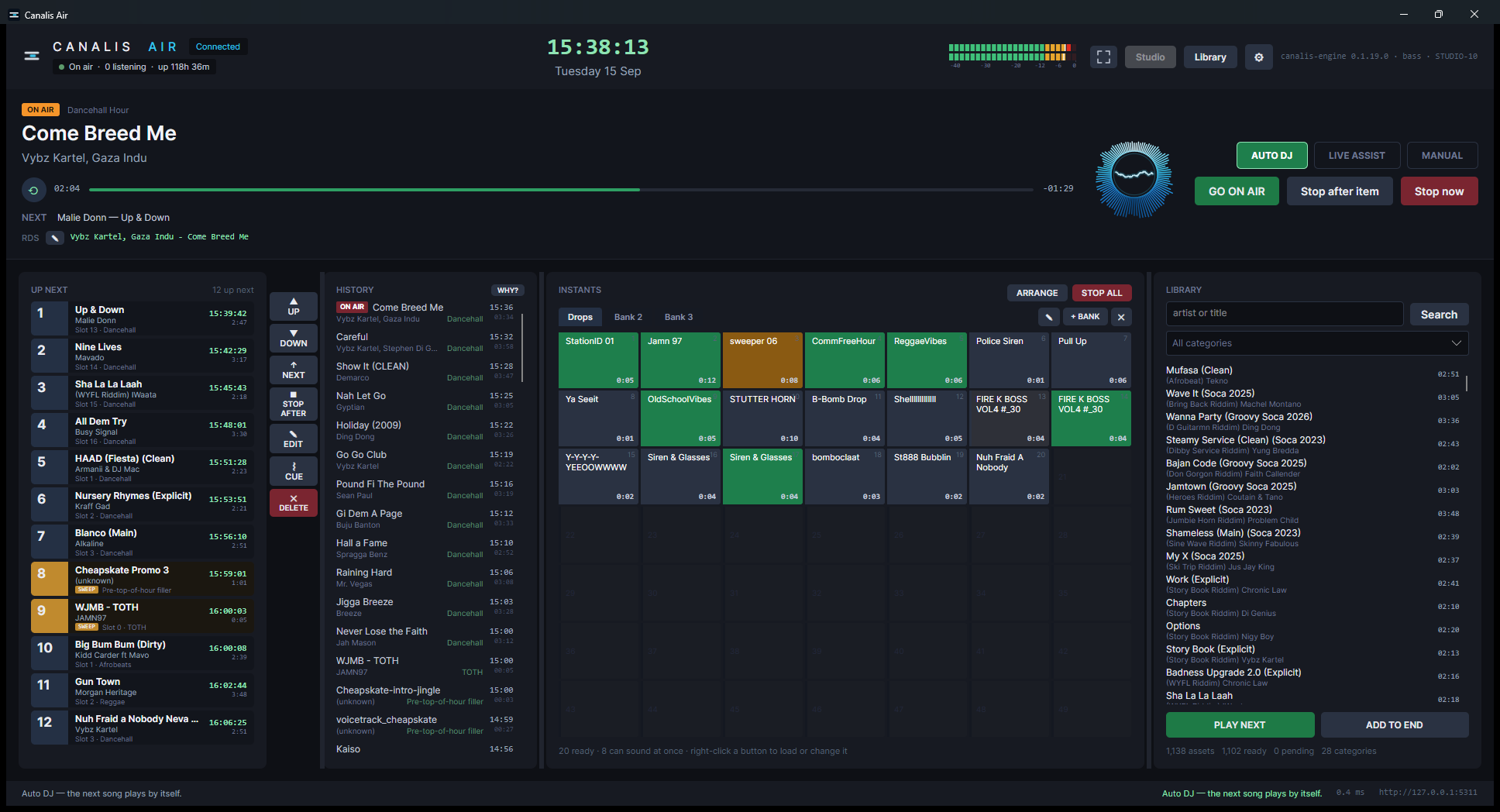
Canalis Air — studio
The Canalis Air studio screen: what is on air, up next, history, the cart wall and the library, all on one screen.
The one rule

A station should keep its promise to the audience: no dead air, ever.

No 2 GB freeze, no gap between songs, no ID that airs early. Canalis Air keeps the station going whether anyone is watching or not — and puts it straight back if anything falls over.

Everything a station runs on
One screen, the whole station

Automation, imaging, streaming and traffic in a single studio — nothing bolted on, nothing to babysit.

🎛️

Auto DJ

The station fills its own hour from your clocks and plays it. Live Assist and Manual are a click away when someone's in the chair.

🕐

Clocks & rotation

Hour templates of slots drawn from categories, with artist and title separation, minimum rest and a repeat floor — an hour that can always be explained.

✅

Capacity check New

Before an hour ever airs, Canalis tells you whether it can be sustained from the library — and, if not, exactly how many songs to add.

🎚️

Crossfades that fit

Each record segues by how it actually ends — a long fade or a cold stop — never one blunt overlap for all. IDs and spots land hard, by design.

📡

Streaming built in

Up to three encoded outputs, with listeners and uptime shown right in the studio header. Ready for Icecast and the usual servers.

💸

Traffic & billing

Advertisers, campaigns, break templates and rate cards, with an as-run log that an invoice is built from.

🔊

Cart wall

Seven-by-seven instant players across several banks — drops, sweepers and IDs, eight sounding at once, one press each.

✂️

Cue & loudness

A full waveform cue editor, per-record levelling measured against the library, and fades set by ear — stored beside the file, never written into it.

🛟

It keeps itself up

The engine has no window and never stops when you close the screen. If it falls, the manager restarts it — and tells you if it won't stay up.
See it working
Real screens, real station

Not mock-ups — Canalis Air running a live Caribbean music library.

Build an hour, know it will fill

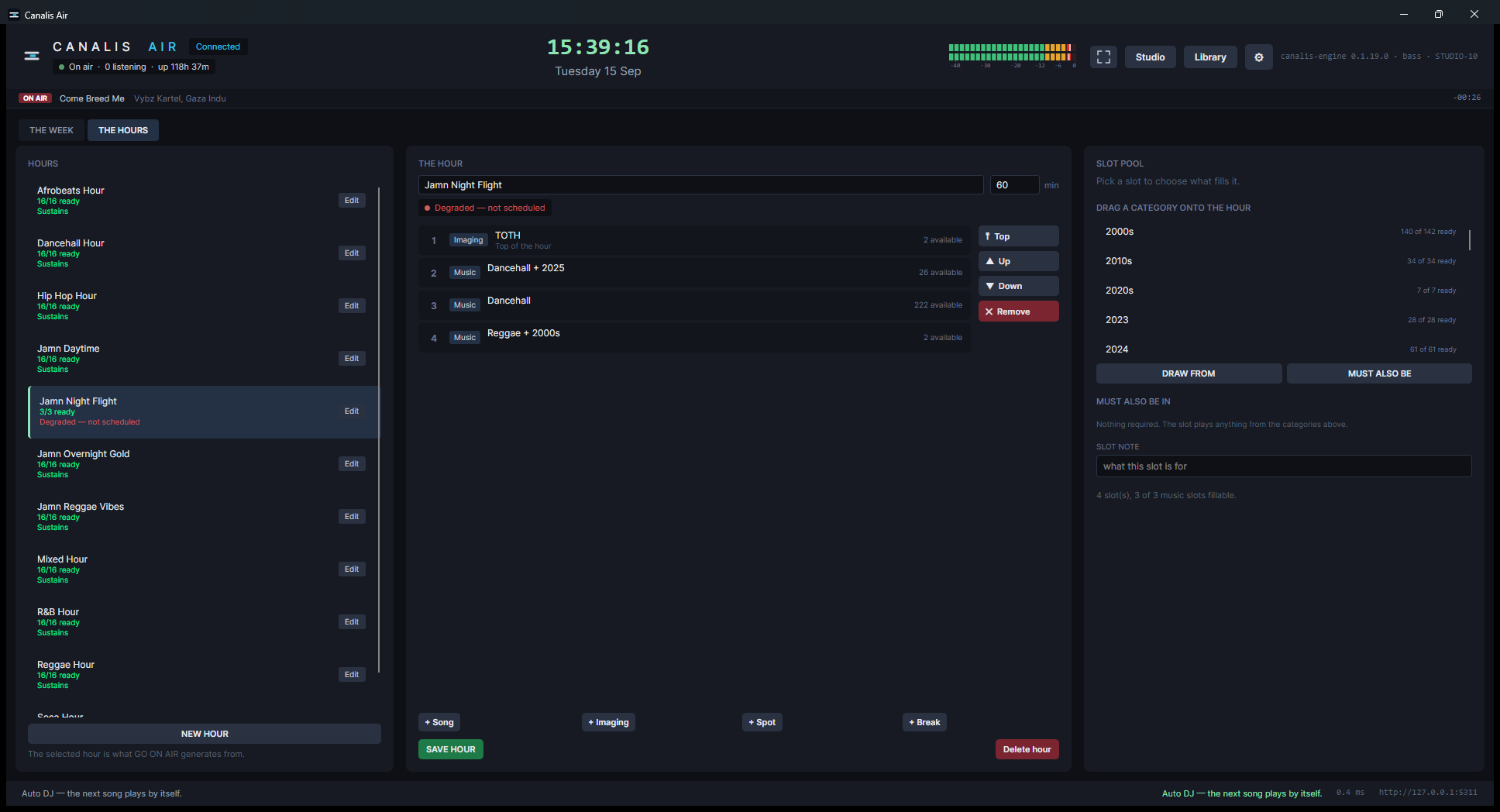
A clock is a template of slots, each drawn from categories with its own pool and filters. Every clock carries a verdict — Sustains, Tight or Degraded — worked out from the library and its separation rules, so you know an hour will hold up before it ever airs.

The count beside each slot is live: readied a batch of songs? It updates without a reload.

Scheduling — the hours
The hours editor: a list of clocks each marked Sustains or Degraded, the selected clock's slots with live availability counts.

And if it can't, it tells you how to fix it

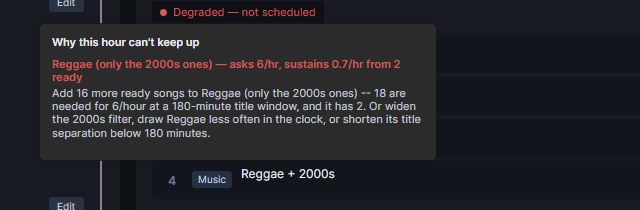
Click a Degraded verdict and Canalis shows the shelf that can't keep up, the numbers behind it, and a plain fix — add 16 more songs, widen the filter, or draw it less often. No guessing why a rotation sounds thin.

Only clocks actually in rotation raise a station-wide warning. A half-built one stays quiet.

Why this hour can't keep up
The capacity breakdown: Reggae 2000s asks 6 per hour but sustains 0.7, with a quantified suggestion to add 16 more songs or widen the filter.
Release 0.1.20
What's new

The latest build sharpens the two things a station notices most: that the hour lands, and that it never goes quiet.

🎯

Top of hour on :00

In Auto DJ, the ID lands exactly on the hour — the crossing record plays its full length and is faded under it. Nothing is cut.

🧮

Design-time capacity

Clocks are checked against the library as you build them, with quantified fixes, and re-checked whenever the library changes.

📶

Stream status in the header

On air, how many are listening and how long it's held — visible without opening the encoder's console.

What it needs
Runs on a normal PC

Self-contained — no runtimes to install, no audio files touched, no station data at risk on an update.

System
Windows 10 or 11, 64-bit
Screen
1366 × 768 or better
Install
Self-contained · ~500 MB · no .NET needed
Audio out
Any Windows device · Icecast streaming
Data
Your library, backed up before every update
Put your station on autopilot

Try Canalis Air on your own library, or talk to us about running it for your station.